

How to Program Your Nissan Garage Door Opener: A Guide for Spokane and Coeur d’Alene Drivers
In Spokane, a garage door opener isn’t just a convenience, it’s a necessity when it’s 20°F on the South Hill or snowing in Coeur d’Alene. Wendle Nissan has been a fixture in the Inland Northwest for over 80 years. We don’t just sell cars, we help our neighbors master the tech available to make Spokane life easier.
Have you ever lost your garage door remote? Read our step-by-step guide to syncing your compatible Nissan with your home, whether using the HomeLink buttons or the new myQ Connected Garage via NissanConnect.
🏠Programming the HomeLink Universal Transceiver
Before getting started, make sure that your current garage door opener in working.
-
- Park safely inside or outside your garage and power on your ignition.
- Locate the HomeLink buttons on the bottom of the vehicle’s review mirror-it’s a row of three buttons.
- Clear any previous programming. Hold the outer two buttons until the light flashes quickly.
- While holding the garage remote 1-3 inches away from the buttons, press and hold down the vehicle button you want to use at the same time as your remote. When the indicator light changes from a slow blink to a rapid blink, release the buttons.
- Test the HomeLink button.
Pro Tip: If the garage door is failing to open, you may need to synchronize the garage door system with the opener in the rearview mirror. To do this, place the vehicle power switch in the on position, leave the vehicle and press the programming button on the garage door drive unit. Get into the vehicle and press the previously programmed button. This last step must be performed within 30 seconds of programming the door drive unit.
Think about it…no more frozen batteries in those old plastic remotes left in the car overnight.
📱Setting up myQ Connected Garage
Before getting started, you will need a compatible Nissan vehicle and a Wi-Fi compatible garage opener. Also, an active NissanConnect service account and the myQ garage and access control mobile app.
- Park safely inside or outside your garage and power on your ignition.
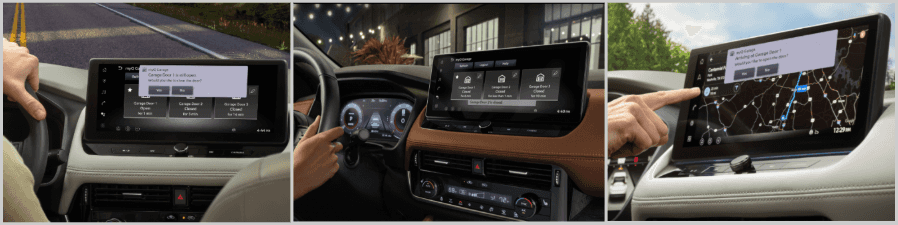
- On your vehicle’s touchscreen display, go to the apps section.
- Select the myQ garage app.
- Using your phone, scan the QR code that pops up on your vehicle’s touchscreen display.
- Log into your myQ account.
- On your phone, tap authorize.
- On your vehicle’s touchscreen display, accept the terms of use.
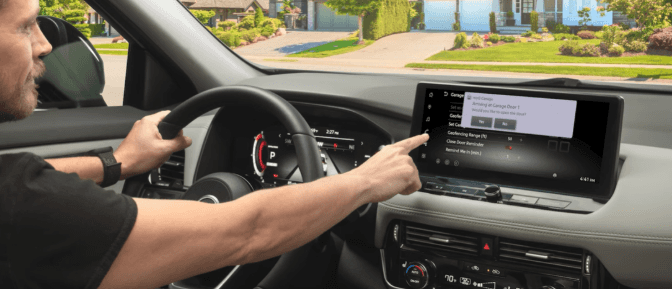
Set up geofencing for additional options.
-
- Parked outside of the garage door, power on your ignition.
- On your vehicle’s touchscreen display, go to the apps section.
- Select the myQ garage app.
- Tap on the garage door pencil edit icon.
- Enable ‘geofencing mode’ then tap on ‘Yes’ to ‘Set Garage Location’.
- Verify your location on the map and tap ‘Set”.
- Set “Geofencing Range’ to your preferred distance of when to receive notifications for opening and closing your garage do. You can select 50 feet up to 500 feet.
- You have the option to set a close door reminder if the door is still open after a specific amount of time.
Imagine heading back home from a day at Mt. Spokane. Your Rogue will sense your almost home and gets the garage door open before you even hit the driveway.
🤝We Offer Expert Support When You Need It
Sometimes technology doesn’t work as you expect, especially with the variety of garage door openers found in Spokane area homes. Our factory-trained technicians know the ins and outs of NissanConnect better than any general shop around Spokane. While another mechanic might understand oil changes, our specialists are specifically trained on Nissan’s software and systems. If you have any questions about connecting your garage door to your Nissan vehicle, they have the answers. Whether it’s figuring out an error code or setting up the latest myQ geofencing on your new Armada, we are here to ensure your commute from Post Falls to North Spokane is as easy as possible.
🌲Seamless Convenience for Your Inland Northwest Lifestyle
At Wendle Nissan, we want your vehicle to make your life easier, not harder. If you’re heading out for a morning of skiing at Mt. Spokane or returning home to Liberty Lake after a long workday, a synced garage door is a small luxury that can make a big difference in our Eastern Washington climate. No more rummaging around for the remote or stepping out into the rain, just quick touch access at your fingertips.
Stop by our dealership on North Division Street today. Let our family take care of yours, ensuring your Nissan is dialed in for your next Inland Northwest adventure.
❔Frequently Asked Questions
Which Nissan models are compatible with myQ Connected Garage?
The following models are equipped with the Connected Garage Door Opener with myQ. This is a game changer for Coeur d’Alene commuters driving along I-90 and can’t remember if they closed their garage door before leaving.
2025 Armada SL, PRO-4X, Platinum, Platinum Reserve
2026 Armada SV, PRO-4X, Platinum, Platinum Reserve
2025 Murano SL, Platinum
2026 Murano SV, SL, Platinum
2026 Leaf S+, SV+, Platinum+
2025 Rogue Platinum, SL
2026 Rogue Platinum
2025 Sentra SR, SL
2026 Sentra SR, SL,
Can any mechanic in Spokane help me with my NissanConnect setup?
While many shops handle basic repairs, our factory-trained technicians know the ins and outs of NissanConnect better than any general shop around Spokane. We use genuine Nissan diagnostic tools and have direct access to the latest software updates, ensuring your garage door link is secure and reliable.
What else can I do with myQ besides connect to my garage door remote?
Beyond controlling your garage door, myQ offers additional tools such as:
- Close door reminders
- Lighting control
- Schedules and alerts
- Diagnostic health report
- Video monitoring
0 comment(s) so far on How to Program Your Nissan Garage Door Opener: A Guide for Spokane and Coeur d’Alene Drivers